❌

Reading view

iPhone Duo é o celular mais incrível da Apple em anos. Só tem um problema

Houve muitas vezes em que eu não queria largar o iPhone Duo. Depois que você se acostuma a ler, assistir TV e navegar pelo Instagram em uma tela gigante, é difícil voltar para um pequeno retângulo brilhante.

Há apenas um problema: muitos aplicativos ainda são feitos para aquele pequeno retângulo.

Esta é a experiência de usar o iPhone Duo, o primeiro iPhone dobrável da Apple, que será lançado em 23 de outubro. Seu preço inicial é de US$ 2.000, o que o torna tão caro quanto o mais recente MacBook Pro de 14 polegadas da Apple. (No Brasil, os valores começam em R$ 21.999).

É uma grande mudança para a Apple, que raramente mexe na fórmula vencedora que transformou o iPhone em um negócio que faturou mais de US$ 200 bilhões no ano passado. Mas, depois de anos de atualizações incrementais do iPhone, a Apple enfrentou a pressão de provar que ainda conseguia cativar os consumidores.

Experimentei um pouco desse futuro depois de passar cerca de uma semana com o novo telefone dobrável que a Apple forneceu à CNN Internacional para testes.

O iPhone Duo se tornou meu tablet para assistir à Netflix, um despertador de cabeceira à noite, uma tela extra para assistir futebol no domingo, um monitor em miniatura quando conectado ao meu teclado Bluetooth e uma câmera com tripé embutido.

Mas houve muitas outras vezes — talvez até mais — em que me frustrei porque os aplicativos não funcionavam como deveriam, já que os desenvolvedores ainda não os atualizaram. E apesar da abordagem “simplesmente funciona” da Apple, o iPhone Duo exige um período de adaptação.

Embora o software do iPhone Duo certamente parecesse muito mais fluido e suave do que as alternativas para Android, muitos de seus recursos principais já estão disponíveis em celulares Samsung ou Google há anos.
iPhone Duo
iPhone Duo • Zoe Todd/CNN via CNN Newsource

O que o iPhone Duo pode fazer que um telefone normal não pode?

O iPhone Duo representa a maior mudança que a Apple fez no iPhone em seus quase 20 anos de história.

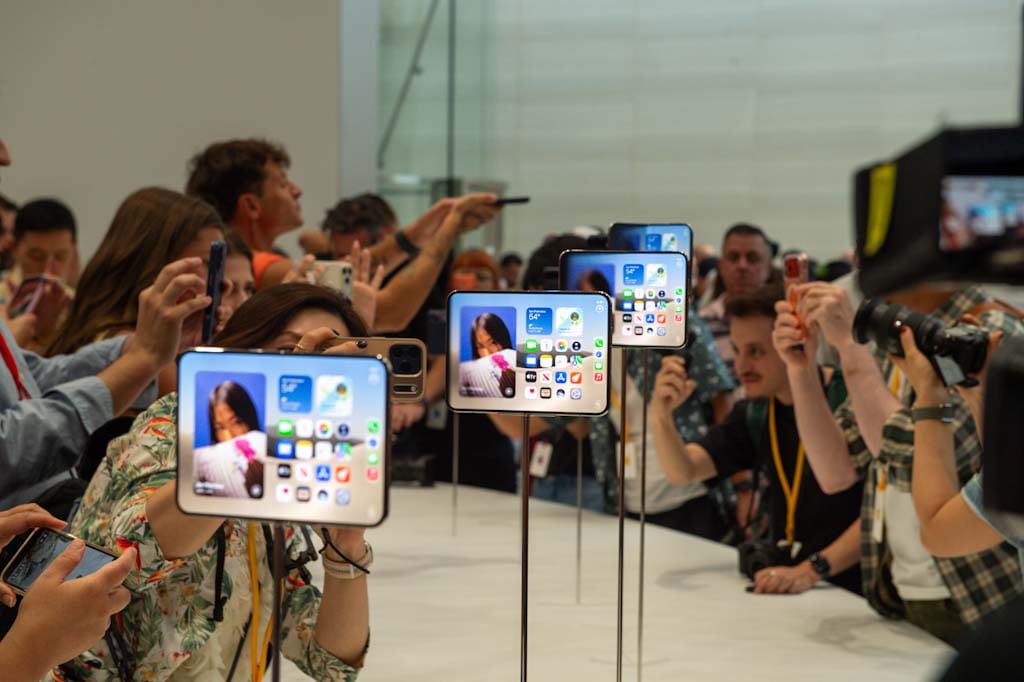
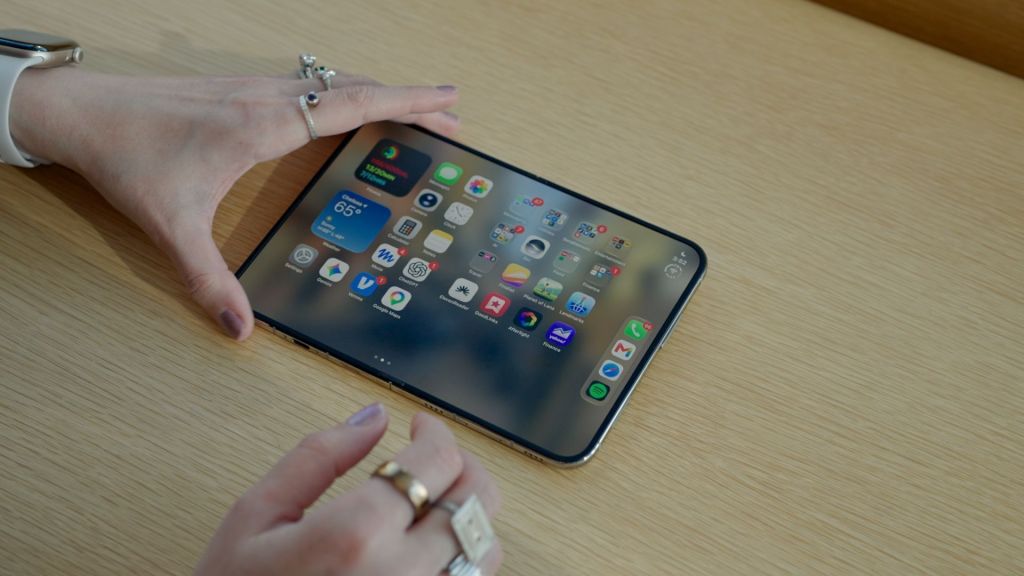
Ele possui uma tela externa de 5,4 polegadas que, ao ser desdobrada, revela uma tela interna de 7,6 polegadas. Fechado, o iPhone Duo lembra um passaporte, porém visivelmente mais grosso e pesado. Aberto, ele se assemelha a um iPad Mini mais fino e compacto.

Uma das perguntas mais frequentes que recebo sobre o iPhone Duo é se a dobra da tela é visível. A resposta, acredite ou não, é não. A dobra é quase imperceptível ao usar aplicativos ou navegar pela tela inicial, e mal a sinto ao deslizar o dedo na tela.

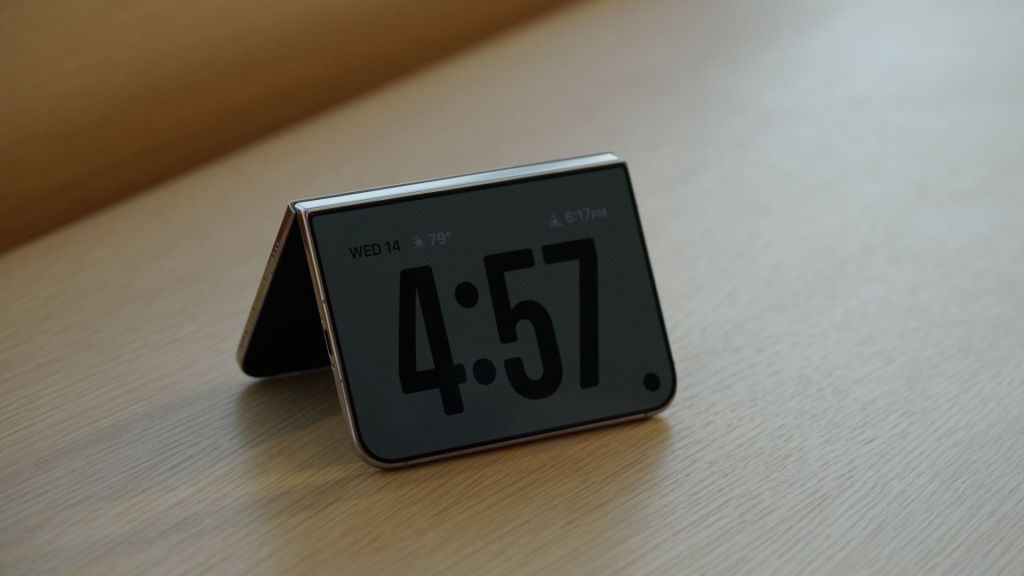
O formato não convencional do iPhone Duo permite que ele faça coisas que você não conseguiria fazer tão facilmente com um telefone comum. Abra-o como uma tenda ou apoie-o como um livro com a tela bloqueada, e o visor se transformará em um relógio de cabeceira, porta-retratos digital ou calendário.

Alguns aplicativos, como a câmera e o Apple Fitness Plus, serão exibidos na parte superior da tela quando dobrado ao meio como um laptop — mas isso depende se os desenvolvedores programaram seus aplicativos para funcionar dessa forma.

Com o telefone aberto, você pode tirar selfies com as câmeras traseiras enquanto visualiza uma prévia na tela externa, o que foi muito útil quando eu estava gravando o vídeo para esta análise.

O iPhone Duo permite executar dois aplicativos na tela simultaneamente, o que foi útil em situações que envolviam pesquisar informações ou visualizar conteúdo em vários aplicativos. Você pode, por exemplo, arrastar e soltar uma imagem diretamente do aplicativo Fotos para uma mensagem de texto quando ambos os aplicativos estão abertos.

Também usei o modo de tela dividida para mostrar a um amigo minha fantasia de Halloween e o personagem do filme em que ela se baseia, tudo ao mesmo tempo.

Embora seja conveniente, provavelmente não é o motivo pelo qual você compraria um iPhone Duo. A tela interna do Duo é melhor aproveitada quando você dedica toda a tela a um único aplicativo, como a Netflix. Além disso, a tela tem um acabamento fosco, que reduz o brilho e não fica com marcas de dedo facilmente.

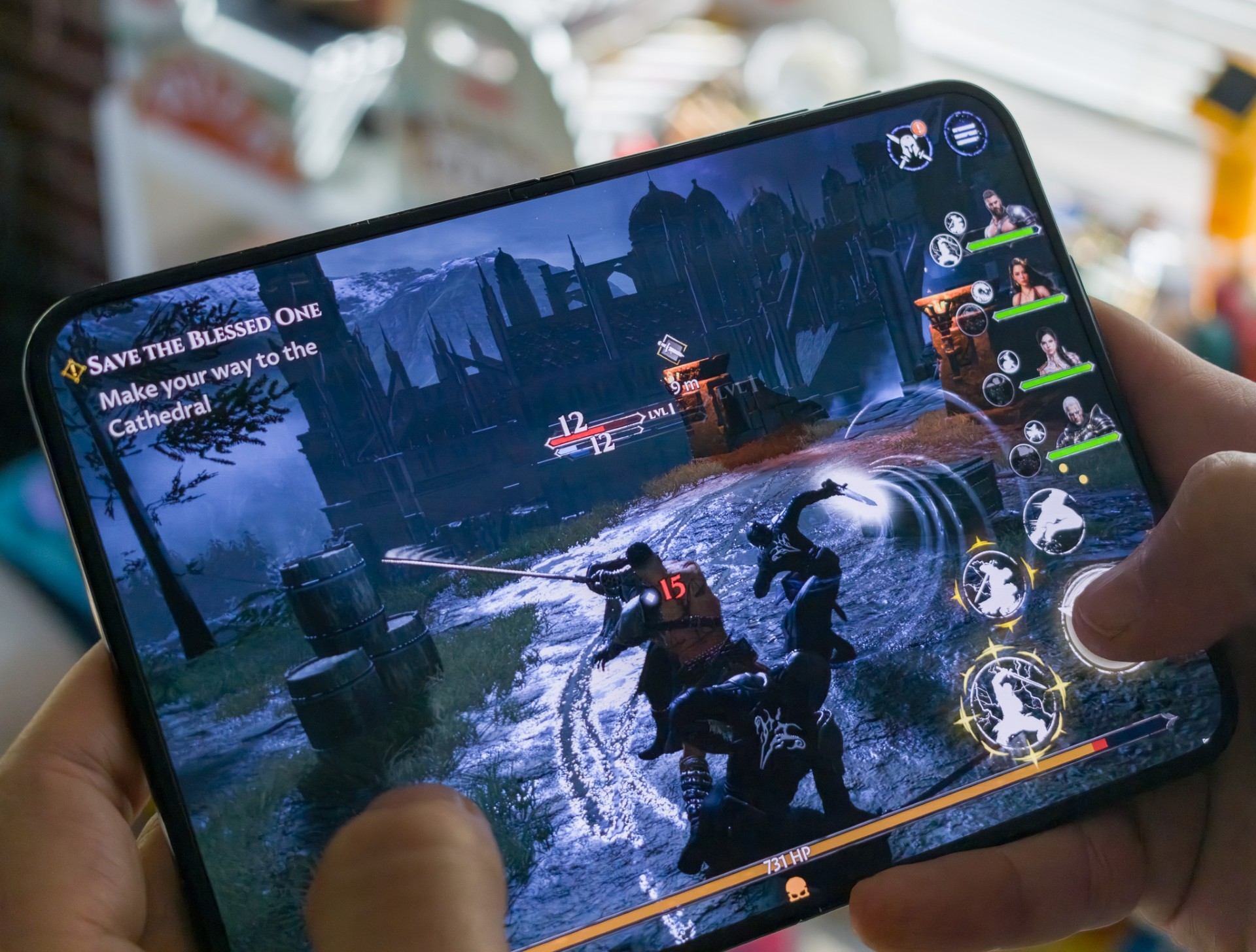
Mas muitos aplicativos, incluindo alguns populares como Google Maps, Gmail, Call of Duty Mobile e Uber, não foram atualizados para aproveitar ao máximo essa tela grande quando testei o Duo antes do lançamento. Alguns aplicativos pareciam janelas flutuantes no meio da tela do tamanho de um tablet.

Esses aplicativos podem se expandir para ocupar mais espaço na tela, mas ainda assim não preenchem todo o espaço.

Outros aplicativos foram atualizados para ocupar a maior parte da tela, mas ainda apresentavam uma barra preta na lateral. Isso é o que acontece quando os desenvolvedores não atualizam seus aplicativos usando as ferramentas de desenvolvimento de software mais recentes da Apple, conforme explicado no site da empresa.

A boa notícia é que mais aplicativos foram atualizados, mesmo durante os poucos dias em que tenho o telefone, incluindo Google, TikTok, Instagram e Threads. Mas a incerteza de não saber como um aplicativo vai ficar parece inconsistente e pode ser irritante — e esse é um aspecto em que o Android saiu na frente.

Os aplicativos otimizados para o Duo oferecem uma amostra do que é possível. Meu aplicativo favorito até agora é o jogo de plataforma e quebra-cabeça Planet of Lana, que fica lindo e colorido na tela maior do Duo.

Eu também gostei muito de usar o Apple Books, que permite visualizar as páginas em ambos os lados da tela quando ela está levemente dobrada, como um livro de verdade. (O aplicativo Kindle da Amazon é um dos muitos que ainda não foram atualizados).

Os aplicativos Mensagens e Mail da Apple também mostram a caixa de entrada à esquerda e as mensagens à direita, para que você possa ver tudo de uma vez.
iPhone Duo
iPhone Duo • Zoe Todd/CNN via CNN Newsource

Mas como ele se comporta como um telefone comum?

Pelo preço, o iPhone Duo deveria ser capaz de fazer tudo o que um celular normal faz e muito mais.

Minha maior preocupação era que o design o tornasse desconfortável de usar quando fechado, mas digitar e deslizar na tela externa é surpreendentemente natural e confortável. Cheguei até a preferir o teclado mais largo do Duo ao do meu iPhone 18 Pro.

Ainda assim, houve uma curva de aprendizado no início. Eu vivia apertando o botão da Siri sem querer, que fica na lateral do Duo, quando na verdade queria apertar os botões de volume na parte superior do telefone.

Também não sabia que era preciso ter um aplicativo aberto para usar o modo de tela dividida, em vez de simplesmente abrir um novo aplicativo e arrastá-lo para um dos lados da tela a partir da tela inicial.

A duração da bateria é razoável e condizente com o que se espera de um celular novo. Normalmente, minha bateria estava em 35% ou 46% na hora de dormir, embora isso sempre varie dependendo dos aplicativos que você estiver usando e da frequência com que usa a tela do tablet em comparação com a tela externa.

O iPhone Duo possui câmeras semelhantes às do iPhone 18 Pro, mas com uma diferença fundamental: não há câmera teleobjetiva. Isso significa que as fotos com zoom não ficarão tão nítidas ou claras quanto as tiradas com o iPhone 18 Pro, embora as fotos capturadas por ambos os telefones sejam semelhantes em outros aspectos.

A pergunta que mais me fazem sobre o iPhone Duo é se vale a pena pagar US$ 2.000. É difícil responder a essa pergunta, considerando que ele custa mais do que um mês de aluguel para a maioria dos americanos.

O único motivo para considerá-lo seria se você realmente quisesse uma tela maior do que a de qualquer outro celular, mas que ainda coubesse no seu bolso.

Meu conselho? Espere até que os desenvolvedores tenham mais tempo para otimizar seus aplicativos antes de decidir. Embora o Duo seja interessante, os aplicativos ainda precisam evoluir bastante.

  •  

Móviles plegables: qué ganas, qué pierdes y cuánto duran de verdad

La expectación ante la llegada del iPhone Duo, que se agotó en reservas online y tiene un plazo de entrega de tres meses, ha vuelto a poner en el centro de la actualidad tecnológica a este tipo de dispositivos. En realidad, la propuesta del primer smartphone plegable de Apple es muy similar a la que hemos visto durante los últimos años en fabricantes como Samsung, Huawei o Motorola: un teléfono que se abre para mostrar una pantalla enorme con la que es posible leer, ver vídeos, consultar documentos o trabajar con varias aplicaciones a la vez de forma más cómoda que con un terminal tradicional. Sin embargo, esa versatilidad tiene un precio, tanto económico como práctico. Las preguntas que muchos se hacen antes de tomar la decisión de adquirirlo son obvias: ¿Merece la pena pagar más por un móvil que se dobla? ¿Es tan delicado como puede parecer? ¿Puede sustituir realmente a una tablet?

Seguir leyendo

💾

© EPV

El presidente de Apple, John Ternus, presenta el iPhone Duo en Cupertino, California (Estados Unidos), el 9 de septiembre.
  •  

Your phone can alert you when prices drop; here's how

Have you ever found something you wanted to buy, only to wonder whether the price might drop next week? Maybe it's a new pair of headphones, a kitchen appliance or a gift you've had your eye on. You could keep checking the website every day, but who has time for that?

Here's something you may not realize. Your phone can help watch prices for you. Apple's Safari browser has a feature that monitors website changes, while Google's shopping tools offer price tracking on supported products.

That means you can spend less time refreshing product listings and more time deciding whether a deal is actually worth your money. I'll show you how to set up these alerts on an Apple iPhone, Samsung Galaxy and Google Pixel.

8 SERIOUSLY ANNOYING TASKS YOU CAN HAND OFF TO AN AI AGENT

Join our upcoming CyberGuy LIVE class: 5 Ways to Travel Smarter and Save Money

In this free live online class, Kurt "CyberGuy" Knutsson will share five practical ways to protect your trip and your wallet this holiday travel season. You’ll learn how to secure your phone and personal information, find better travel deals, avoid common scams, save money on bookings and use technology to make your travels easier and less stressful. No technical experience is needed.

Join us Saturday, Oct. 31, at 11 AM ET/8 AM PT. Register free now at CyberGuyLive.com.

How to get price-drop alerts on iPhone running iOS 27

Apple introduced a feature called Notify Me in Safari with iOS 27. Instead of returning to a website to see whether something has changed, you can tell Safari what to watch. For example, you might ask Safari to notify you when a pair of headphones drops below $150. You could also monitor a sold-out item and get an alert when the website indicates it's available again.

Unlike a traditional price tracker, Safari can look for other changes on a webpage, too. However, the feature doesn't work with every website, and alerts depend on Safari detecting the requested change.

Important: Notify Me requires Apple Intelligence. It works on compatible models, including the iPhone 15 Pro, iPhone 15 Pro Max and iPhone 16 or later. The standard iPhone 15 and iPhone 15 Plus do not support Apple Intelligence.

Steps to set up Safari Notify Me

  • Open Safari on your iPhone.
  • Visit the product page you want to monitor.
  • Tap the Page Menu button in the address bar. It may appear as a puzzle piece.
  • Select Notify Me.
  • Choose a suggested request or enter what you want Safari to watch, such as "Notify me when the price drops below $150."
  • To change how often Safari checks the webpage, tap Edit and select your preferred interval.
  • Tap the checkmark to finish.
  • Allow notifications if your iPhone asks for permission.

Safari checks the page at your selected interval and sends a notification when it detects the change you requested. The available checking intervals include hourly, daily, weekly and monthly options. You can also use Notify Me for something other than shopping, such as watching for event tickets or a registration page to open. Just remember that updates are not necessarily instantaneous.

Can you track prices on an iPhone without Apple Intelligence?

Yes. If you have a standard iPhone 15 or another model that doesn't support Safari Notify Me, you can use Google Chrome instead. Google offers Chrome price tracking on iPhones running iOS 15 or later, including iOS 27. It works on supported product pages and requires a signed-in Google Account, history synchronization and the necessary browsing settings.

Steps to track prices using Chrome on iPhone

  • Open Google Chrome on your iPhone.
  • Visit the webpage of the product you want to track.
  • Tap the three-dot More menu.
  • Look for and select Track Price, if available.
  • Scroll through the available products and select the one you want.
  • Tap Track, then Done.
  • Allow Chrome notifications when prompted.

To manage tracked products, look for Track Price in Chrome's three-dot menu. You may also find alert controls under Chrome > three-dot menu > Settings > Notifications. The exact options can vary by Chrome version and account.

Don't see Track Price? The option may not be available for that product or your account. You can also try searching for the product in the Google app and looking for a price-tracking option in its shopping results.

ANTI-SCAM SETTINGS ON IPHONE, PIXEL AND GALAXY YOU SHOULD CHECK

How to get price-drop alerts on Samsung Galaxy and Google Pixel

Samsung Galaxy and Google Pixel owners can use Google's shopping tools to track products and receive alerts when prices fall. The easiest place to start is the Google app, which works similarly on both phones. Chrome may also show price-drop indicators on shopping pages you've left open.

How to track a product using the Google app

  • Open the Google app on your Samsung Galaxy or Google Pixel.
  • Tap the search bar at the top of the screen.
  • Type the name of a product you want to buy, such as Samsung Galaxy Buds3 Pro, then tap Search.
  • Look for a picture of the product with its name and price in the search results. You may need to scroll down.
  • Tap the product's picture or name to see more details.
  • Look for Track price or a bell-shaped price-tracking icon and tap it if available.
  • Select your preferred size, color or other options if asked.
  • Choose the price you want to pay if Google gives you that option.
  • Tap OK to confirm.

Google can send you a notification on your phone or an email when the product reaches your selected price. Make sure you're signed into your Google Account and have notifications enabled.

Don't see Track price? Go back to your search results and tap Shopping near the top of the screen. Select the product you want and look for Track price again. Google doesn't offer price tracking for every product, and the option may not appear for every account.

How to track prices directly in Chrome on Android

There's another handy option for Samsung Galaxy and Google Pixel owners. Chrome can actively track prices on supported product pages and alert you when they drop. That means you don't have to leave a shopping tab open and keep checking it yourself.

Here's how to get started:

  • Open Chrome on your Samsung Galaxy or Google Pixel.
  • Visit the product page you want to monitor.
  • Tap the three-dot More menu in the upper-right corner.
  • Select Track prices, if available.
  • If Chrome displays a first-time introduction, tap Show me.
  • Follow any remaining prompts to enable tracking.

You can find your tracked items under Chrome > three-dot menu > Bookmarks > Tracked products. To manage alerts, go to Chrome > three-dot menu > Settings > Google services > Get price tracking notifications. From there, you can adjust mobile and email notifications. Keep in mind that this feature only works on supported product pages. You'll also need to be signed into Chrome with your Google Account, enable syncing for tabs and browsing history and turn on Make searches and browsing better.

AI SHOPPING CARTS COULD DRIVE UP YOUR GROCERY BILL

Google's new Universal Cart adds another way to track prices

Google introduced Universal Cart in the United States earlier this month. The feature is rolling out across Google Search and the Gemini app, giving shoppers another way to keep track of products without constantly checking different websites. Universal Cart lets you save items from multiple retailers in one place. Once you've added a product, Google's shopping tools can monitor its price and alert you when the cost drops or an out-of-stock item becomes available again. The cart can also identify promotional codes and suggest payment options that may help you save money.

For example, if you're shopping for a new TV, you can save models from different stores and let Google watch for price changes. When you're ready to buy, you can complete eligible purchases through Google Pay or finish checkout directly on the retailer's website. Universal Cart is rolling out in the U.S., so it may not appear in every account immediately. It's another option worth checking if you already use Google Search or Gemini to shop.

Why your phone might not show the price-tracking option

If you don't see Notify Me or Track price, the feature may be unavailable for your phone, account or shopping website. Start by checking that your apps and browser are updated. On iPhone, Safari Notify Me requires a compatible device with Apple Intelligence enabled. For Google's shopping tools, make sure you're signed into your Google Account. Chrome may also require additional browsing or synchronization settings for certain shopping features.

Some product pages simply don't support tracking. In that case, try another retailer's listing for the same item. Google's price-tracking features are available in supported countries, including the United States, although availability varies by product and account.

Three things to check before buying after a price alert

A lower price can be tempting, especially when a notification pops up while you're doing something else. However, I wouldn't rush to check out without checking a few details.

  • Look at the price history. Chrome's Shopping Insights can show historical pricing on eligible products. That can help you determine whether today's discount is unusually good or fairly common.
  • Check the total cost. Shipping fees, taxes and optional extras can change how much you actually pay. Compare the final checkout price, not just the advertised discount.
  • Make sure you're buying the right version. A lower price might apply to a different storage capacity, color, model year or product condition. Check the details before placing an order.

A price alert tells you something has changed. It doesn't necessarily mean you've found the lowest available price.

A quick privacy consideration

Price tracking comes with a privacy trade-off worth understanding. Google's shopping tools use your Google Account to manage tracked products and alerts. Certain Chrome shopping features may also require additional browsing information or settings, including Make searches and browsing better. You should review those options before enabling them.

That setting allows Chrome to share browsing-related information with Google to improve its services. You can review these options under Chrome > 3 dots in the upper right >Settings > Google services. Apple's Safari Notify Me uses Apple Intelligence to monitor webpages for requested changes. Before enabling either feature, consider whether the convenience is worth the information and permissions involved.

One more shopping safety tip

Be careful about clicking price-drop alerts or shopping links from unfamiliar senders. Scammers can create fake sale notifications that lead to fraudulent websites. Strong antivirus software can provide an additional layer of protection by helping detect malicious links, phishing attempts and other online threats. Get my picks for the best 2026 antivirus protection winners for your Windows, Mac, Android and iOS devices at CyberGuy.com.

Kurt's key takeaways

I've lost count of how many times I've looked at something online, decided to wait and then completely forgotten to check whether the price dropped. That's why I like having my phone do some of the watching for me. With Safari's Notify Me feature in iOS 27, compatible iPhones can monitor more than just prices. 

Meanwhile, Google's shopping tools can help Samsung Galaxy and Pixel owners follow prices on supported products, while Chrome offers additional shopping features on compatible devices. My advice is to start with something you actually need, especially a larger purchase where a price drop could save you a meaningful amount. Set up an alert and see what happens. You might save some money without spending your evenings hunting through shopping websites.

Have you ever bought something only to see the price drop a few days later? Would you trust your phone to watch prices for you, or do you prefer hunting for deals yourself? Let us know by writing to us at CyberGuy.com.

Sign up for my FREE CyberGuy Newsletter

  • Get my best tech tips, urgent security alerts and exclusive deals delivered straight to your inbox.
  • For simple, real-world ways to spot scams early and stay protected, visit CyberGuy.com – trusted by millions who watch CyberGuy on TV daily.
  • Plus, you'll get instant access to my Ultimate Scam Survival Guide free when you join.

CLICK HERE TO DOWNLOAD THE FOX NEWS APP

Copyright 2026 CyberGuy.com. All rights reserved.

  •  

El iPhone Duo de 2.300 euros desata una fiebre inédita por los plegables: se agota y acumula tres meses de espera

El iPhone Duo ya ha batido récords antes de salir a la venta. A los pocos minutos de iniciarse las reservas online el viernes pasado, ya se agotó el stock en todo el mundo del primer móvil plegable de Apple, que además, en toda la historia de los iPhone, ya es el modelo que más retraso de entrega acumula en su lanzamiento. El plazo de entrega mínimo es de tres meses. Si se intenta comprar ahora mismo en España, no llegará hasta finales de enero de 2027, mientras que en otros países se retrasa hasta febrero. El gigante tecnológico estadounidense explica estos problemas por una demanda “sencillamente extraordinaria”, mientras que sus críticos culpan a Apple de no haber sido capaz de tener suficientes unidades de este modelo, de fabricación extremadamente compleja.

Seguir leyendo

© picture alliance (Getty Images)

Presentación del iPhone Duo el pasado 9 de septiembre en la sede central de Apple en Cupertino (California, EE UU).
  •  

iPhone Duo: es el mejor plegable pero viene con importantes sacrificios

El pliegue apenas se aprecia tras una semana de uso y resuelve mejor que la competencia el cambio de formato, pero renuncia a Face ID y su cámara queda por debajo de la de los iPhone 18 Pro Leer

El pliegue apenas se aprecia tras una semana de uso y resuelve mejor que la competencia el cambio de formato, pero renuncia a Face ID y su cámara queda por debajo de la de los iPhone 18 Pro
  •  

Turn membership cards into digital passes on your phone

Take a look inside your wallet. There is a good chance at least one piece of plastic in there does little more than display a barcode. Maybe it is your library card. Perhaps it is a gym membership, grocery rewards card or another card you pull out every once in a while. Until now, getting some of those cards onto an iPhone could depend on whether the organization offered its own digital pass. Apple is changing that with iOS 27.

The latest iPhone software lets you create your own pass in Apple Wallet from a physical card, photo or screenshot. Samsung Galaxy and Google Pixel owners have similar options, which means you may be able to leave a few more plastic cards at home. Here is how to turn a membership card into a digital pass on all three phones.

Join our upcoming CyberGuy LIVE class: 5 Ways to Travel Smarter and Save Money

In this free live online class, Kurt "CyberGuy" Knutsson will share five practical ways to protect your trip and your wallet this holiday travel season. You’ll learn how to secure your phone and personal information, find better travel deals, avoid common scams, save money on bookings and use technology to make your travels easier and less stressful. No technical experience is needed.

Join us Saturday, October 31, at 11 AM ET / 8 AM PT. Register free now at CyberGuyLive.com.

HOW TO SEARCH ANYTHING ON IPHONE, GALAXY AND PIXEL

What's new with Apple Wallet in iOS 27?

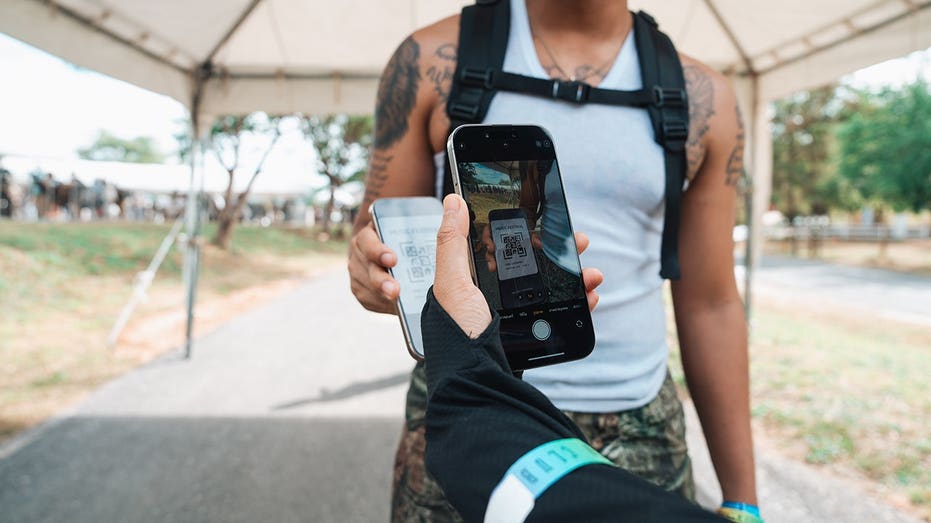
Apple added the ability to create your own passes in Wallet with iOS 27. This comes in handy when a membership or loyalty card has a barcode or QR code, but the organization never gave you an "Add to Apple Wallet" button. Apple specifically points to library cards and gym memberships as examples.

If you have an Apple Intelligence-compatible iPhone, you can create a pass from a photo or screenshot containing the barcode or QR code. Apple Intelligence recognizes the code and can give you the option to add it to Wallet.

Apple Intelligence on iOS 27 requires a supported device, including the iPhone 15 Pro, iPhone 15 Pro Max or iPhone 16 family and later compatible models. Availability can also depend on your language and region. However, Apple also gives you a manual way to create a pass directly inside Wallet.

How to create an Apple Wallet pass from a photo or screenshot

First, make sure the barcode or QR code is clearly visible. A blurry photo could make the code difficult for your iPhone to recognize or for a scanner to read later. On a compatible iPhone, Apple Intelligence can recognize the barcode or QR code in a photo or screenshot and offer to create a Wallet pass.

On a compatible iPhone running iOS 27 or later:

  • Take a photo or screenshot that includes the barcode or QR code.
  • Tap Add Pass to Wallet when the option appears. If you're viewing an existing photo in the Photos app, tap the Info button or swipe up to find that option.
  • Follow the on-screen instructions.

Pro tip: After you create the pass, you can tap View Original Photo to see the image you used.

How to manually create a pass in Apple Wallet

You can also build a pass yourself in iOS 27. This gives you another option when you want to add the information manually.

  • Open the Wallet app on your iPhone.
  • Tap the + button, then tap Create a Pass.
  • Tap Create Pass Manually, then choose a template.
  • Tap any field to enter or edit its information.
  • When you're finished, tap Done.

How to edit a pass you created in Apple Wallet

Once you've created a pass, you can customize its appearance or change the information it contains. You can also add or remove fields if you want different details displayed.

  • Open the Wallet app.
  • Tap the pass you want to change.
  • Tap the More button, then tap Edit Pass.
  • To change the background or color, tap the paint palette button.
  • To change which fields appear, tap the Edit button > Add or Remove Fields, then select the fields you want.
  • To change information already on the pass, tap the field you want to edit.
  • When you're finished, tap Done.

HERE'S SOME TIPS ON HOW TO ORGANIZE PHOTOS WITH KEYWORDS ON YOUR PHONE

How to add a membership card to Samsung Wallet

Samsung Galaxy owners already have a similar option through Samsung Wallet. Samsung says almost any membership card with a barcode can be stored in the app.

On a Galaxy phone running the latest available Samsung software:

  • Open Samsung Wallet.
  • Tap All.
  • Tap Memberships.
  • Choose how you want to add the card.
  • Select Import from Gallery if you already photographed it, or choose Take a picture to scan its barcode or QR code.
  • You can also choose the option to enter membership information manually.
  • Follow the onscreen instructions to save the card.

Samsung also supports participating memberships that are already built into Wallet. Once you need the card, open Samsung Wallet and select the membership. The barcode can then appear on your screen for a cashier or compatible reader to scan. Menu names can vary slightly depending on your Galaxy model and Samsung Wallet version.

How to turn a membership card into a Google Wallet pass on Pixel

Google Wallet can save passes from images when they contain a barcode or QR code. Google specifically lists library cards, gym passes and parking passes as examples.

On a Google Pixel running the latest software:

  • Take a clear photo of the card and make sure its barcode or QR code is easy to see.
  • Open Google Wallet.
  • Tap Add to Wallet.
  • Tap Photo.
  • Tap Manual.
  • Tap the photo library icon.
  • Choose the photo of your card.
  • Add a name and description for the pass.
  • Tap Add.

When you need the card, open Google Wallet and select the pass. You can then scan its barcode or QR code at the reader.

Tip: Google also lets you return to the original image you used to create the pass. Open the pass and tap the More button in the upper-right corner to find the original image.

You may also see Everything else under Add to Wallet. Google uses this option for creating other types of passes from a photo. Select Everything else, accept the consent terms if prompted, then take a photo or choose one from your phone. Google will preview the information it detects so you can review and manually edit it before tapping Add.

What kinds of cards should you try?

Start with cards whose main purpose is giving a business or organization a barcode or QR code to scan. A library card is an obvious candidate. Gym memberships and store loyalty cards may work well, too. Parking passes and other simple barcode-based credentials can also be good candidates, depending on how the organization verifies them.

The easiest test is to look at the physical card. If the person behind the counter normally scans a static barcode or QR code printed on it, there is a reasonable chance a digital version can work. Keep the physical card until you have successfully tested the digital version. Some scanners may have trouble reading a phone display, and some organizations may require the original card.

What these homemade digital passes cannot replace

There is an important limit here. Creating a digital pass from a photograph does not turn every card in your wallet into an official digital credential. Do not assume you can photograph a driver's license, credit card, secure workplace badge or another sensitive credential and use the resulting image as an official replacement.

Some digital credentials require verification from the organization that issued them. Payment cards also have separate security and enrollment requirements. Event tickets deserve extra caution. Many ticketing services now use barcodes that refresh or change to prevent fraud. A screenshot of one of those codes may fail at the gate. Whenever an issuer provides an official Add to Apple Wallet, Add to Google Wallet or Samsung Wallet option, use that instead.

YOUR PHONE SAYS IT'S UPDATED. CHECK OTHER SETTINGS, TOO

Kurt's key takeaways

I like this iOS 27 addition because it fixes a surprisingly annoying limitation. I have had plenty of cards with perfectly usable barcodes that could not go into Apple Wallet simply because the organization behind them never created a digital pass.

Now Apple is giving iPhone owners more control over that process. Samsung and Google already offer useful ways to accomplish something similar, so this is one of those rare phone features that can help you regardless of which of the big three you carry.

I would start with the low-risk stuff. Put your library card or gym membership on your phone and see how it goes. If it saves you from carrying another card around every day, great. Just remember that a photo-based pass and an official digital credential are very different things. Your phone can replace more of your wallet than it used to, but I would not empty the whole thing yet.

If your phone could replace every card in your wallet tomorrow, which physical card would you be most nervous about giving up for good? Let us know by writing to us at CyberGuy.com.

Sign up for my FREE CyberGuy Newsletter

  • Get my best tech tips, urgent security alerts and exclusive deals delivered straight to your inbox.
  • For simple, real-world ways to spot scams early and stay protected, visit CyberGuy.com – trusted by millions who watch CyberGuy on TV daily.
  • Plus, you'll get instant access to my Ultimate Scam Survival Guide free when you join.

CLICK HERE TO DOWNLOAD THE FOX NEWS APP

Copyright 2026 CyberGuy.com. All rights reserved.

  •  

Want Apple's folding iPhone? 'Duo' you have patience?

iPhone Duo
Apple launched preorders for the iPhone Duo on Friday.

credit should read CFOTO/Future Publishing via Getty Images

  • Preorder sales for Apple's iPhone Duo kicked off on Friday.
  • Unless you pounced, don't expect to receive your shipment in time for Christmas.
  • Shipping dates have slipped into 2027 due to current demand and Apple's initial supply, which was expected to be limited.

Anyone purchasing an Apple iPhone Duo online as a Christmas gift may want to find a backup plan.

Expected shipment dates for new orders of the highly anticipated smartphone model have been pushed back to January 25, 2027. That includes iPhone Duos across all available carriers, colors, and storage sizes. For those who pounced on preorders when they went live early Friday morning, shipments will start arriving as early as October 23.

For latecomers, there is always the Hunger Games that is lining up early outside an Apple store on launch day to try to snag in-store inventory. The cheapest version of the foldable phone, with 256 GB of storage, costs $1,999. The model with 2 TB of storage is priced at $3,199.

While early demand for the iPhone Duo is certainly a factor in pushing back shipping dates, it's not unusual for new Apple products to see extended shipment times. Apple is also navigating "limited" supply due to supply chain constraints, Bloomberg previously reported.

Then-CEO Tim Cook talked about general supply constraints on Apple's broader product lineup during the company's third-quarter earnings call in July.

"If you look forward into the current quarter, the September quarter, we continue to expect high levels of demand," Cook said, speaking of broader product demand. "However, with less flexibility in the supply chain, we expect the impact from the supply constraints to increase significantly sequentially."

Read the original article on Business Insider

  •  
❌